Online Resources For Improving Do Chuid Gaeilge

Updated: Apr 24
Despite being a minority language, Irish has an incredible wealth of digital resources to support learners and speakers at all levels, thanks to the efforts of several individuals and groups. Whether you are a beginner or looking to deepen your fluency, the following resources are invaluable tools and references for learning Irish and checking your work. It is strongly recommended that you avoid automatic translation tools and LLMs to learn Irish. The resources below will help you learn idiomatic and grammatically correct Irish to keep you on the right track!

Online Dictionaries:
Foclóir is an incredible resource for learners as an English-Irish dictionary. It has a very helpful database of examples of Irish words in context. It's usually where I point new learners when I see them reaching for Google Translate and ChatGPT, as these "tools" will often pick a word where one of its meanings is the word you had in English... but it doesn't mean the same thing in context in Irish. Frustrating! One of my favourite things about Fócloir is that you can put short English phrases as well in the search bar, and it will very often have example sentences, so you can see the idiomatic equivalent in Irish and how the grammar around it works. This makes it very easy to swap things out as needed to make up your own sentence.
Contextual Translations: The dictionary provides phrases and sentences showing how words are used in context (with a headline describing the context for different groupings), which helps in understanding nuances.
Word Usage: It takes the English word you looked up and shows you what you need for different parts of speech (so if you need an adverb, a noun, a verb, or whatever, it has it organised and grouped by part-of-speech to make it easy)
Sound files: Many of the entries have sound files in all three major dialects, so you can listen to an unfamiliar word.
In addition to the English-Irish dictionary, Fócloir now has an Irish-Irish dictionary. This is probably most useful to L1 speakers who would like to be able to look up words in their first language and advanced L2 speakers (I'd say this didn't really come in handy until I was at a B2 level) who can benefit from describing new words in terms of other Irish words they know (this makes a great exercise).
Unfortunately, there are a few features that Fócloir used to have before they added the Irish-Irish dictionary that I wish they would bring back:
Search Functionality: The advanced search option was fantastic. I particularly liked that you could look words up by part of speech (including prefix and suffix too, but it was by English affix if memory serves me right, and there weren't any Irish suffixes listed-- I think they may have had a few Irish prefixes listed). You could filter by subject/domain (which thankfully is a feature of the tearma.ie advanced search also). My favourite feature was the ability to filter by style, which meant if you left the other fields blank, you could see all the entries for say, very informal speech or vulgarity-- which I think is quite important when you're really learning a language!
Link from Teanglann (below): It used to be that if you found an entry in Teanglann on the English-Irish dictionary, there was a link that you could follow to take you to the Fócloir entry. Since Fócloir updated, that link is broken.
Teanglann.ie is a comprehensive online resource from Foras na Gaeilge, built by Michal Měchura. It offers three major dictionaries: the Ó Dónaill's Irish-English Dictionary, de Bhaldraithe’s English-Irish Dictionary, and the Foclóir Beag monolingual Irish dictionary, catering to both advanced and beginner learners. The site also features:
Pronunciation Database: This includes audio pronunciations from native speakers, helping users grasp the correct pronunciation of words.
Grammar Database: You can select from the tenses and see the different forms of the word to get what you need for your sentence. Class.
And!
The Grammar Wizard: A fantastic tool where you can check how to combine different words from different parts of speech. So, for instance, say you have a noun, and you want to add an adjective after it. That might get confusing as far as whether the noun is feminine or masculine, and if it's plural, and if it's a strong plural and aaahhh (just kidding, it's not that bad once you know the rules, but it can be very helpful to check your construction with the wizard). Highly recommend! And there is a tutorial on how to use it if you scroll to the bottom of the page and click on Grammar Wizard.
To say I spend maybe 30% of my day on Teanglann would probably not be that much of an exaggeration.
Ahh Tearma.ie, how can I express my love for thee? This is where I spend the other 70% of my day. Ok, probably more like 10% when I'm not actively writing a paper... but for specialized vocabulary, Téarma is the premier terminological dictionary. Of course, there's a large overlap with the other dictionaries, so many people use it as their go-to dictionary. Managed by the Gaois research group at Dublin City University, it includes:
Technical and Academic Terms: Providing accurate equivalencies for terms in fields such as science, technology, law, and medicine.
Up-to-date Terminology: Regularly updated to reflect new terms and usages as they develop in various professional and academic contexts.
Search Filters: The advanced search feature is superb! Users can search by term, a part of the term (so ends with, begins with, contains), domain, part-of-speech, and languages other than English or Irish, making it easy to find specific information. You also have the ability to use wildcards in your advanced search, making it reeeeaaallyy powerful. You can learn how this works by clicking on "Help with advanced search".
Téarma.ie is essential for professionals, academics, and students dealing with specialized subjects in Irish. If you happen to find that they don't have a word you need, you can also submit a request/suggestion to them (Cuir ceist téarmaíochta).
Pronunciation
If you don't know about abair.ie, allow me to change your life. You can select from a variety of areas in Ireland (they have all 3 major dialects represented and are adding more regions as they go). It helps a lot to be able to listen to full sentences and different grammatical forms not covered by the Fócloir and Teanglann database. You can slow the speech down, see the IPA transcription, and download the audio if you like.

Now, if you were familiar with Abair, allow me to tell you about something that fewer people seem to know about: An Scéalaí.

An Scléalaí is one of my favourite things ever. I'm not exaggerating, I'm just that much of a nerd. Go and make yourself an account and see for yourself. What you'll find is that you can make documents with a bunch of bells and whistles to help you with your writing. So think Abair, but you can come back to it and keep editing later (and you can write a whole document). It's not exactly Gaeilgeoir Google Docs, but that's what I call it (I'd love it if I could send a share link to collaborators). Why is it so great? Well, you've got a Foclóir search bar if you click on Dictionary, so you don't have to leave your screen to look up a word as you're writing. It also has Gramadóir (discussed below) integrated with it, so you can have it check your grammar as you write. There's also An Bat Mírialta to help you with irregular verbs, though I've not tried that function.
Using the Abair voices, you can have it read out the writing to you. By clicking on the left-hand arrow as you hover, it will read out the sentence. By clicking on the right-hand arrow, it will read out the word directly under your cursor. You also have the Recordings option, which synthesizes your sentences using any voice you choose (scroll to the bottom of the pop-up window to select), and allows you to record it yourself and compare. One of my favourite uses of An Scléalaí is to write out the lyrics of the latest Sean-Nós song I'm learning and come back to it regularly to practice pronunciation.
You also have the Speak option, which allows you to dictate instead of typing! Isn't that handy?
Other Tools
Gramadóir
You'll find the web interface for Gramadóir here https://cadhan.com/gramadoir/foirm-en.html. There's also loads of other great resources there, many of which are integrated into other resources mentioned in this post or otherwise (shout out to Kevin Scannell).
I use it every single day to double-check my sentences and often find a completely avoidable mistake I just simply missed if I don't. It's particularly helpful, though, if you've got a big sentence and you're nervous about the construction. My workflow often looks like:
Check the English word in context with Fócloir or the Irish word I think I want to use with Potafocal (below) or Corpas (also below).
Play around with it until I have a sentence I think works, utilising the Grammar Wizard on Teanglann for tricky bits.
Plug it into the Gramadóir web interface and make the changes it suggests as appropriate.
If I'm really nervous, I'll grab short clips and plug that into Corpas just to see if people have used that particular grouping of words. Sometimes with more technical/niche writing, that's not really going to help, but it certainly comes in handy most of the time!
There are a bunch of tools on Potafocal, which you can see below. There's also Intergaelic on the website, which acts as an inter-Gaelic dictionary AND allows you to do automatic translation between the three Q-Celtic languages (to Irish, that is). One of my favourite things about Potafocal is that it has a glossary from Beo!, which is an online newspaper you can still access, funded by Oideas Gael. Makes sense, Michal built both websites (as with, I assume, most of the websites mentioned in this post). Beo! has a host of idiomatic Donegal Irish in its articles, so if I can't find something super "Ulstery" like "cad tuige" on Teanglann or Fócloir... it's usually on Potafocal, in context, with the relevant phrase also written in English. All praise Potafocal.
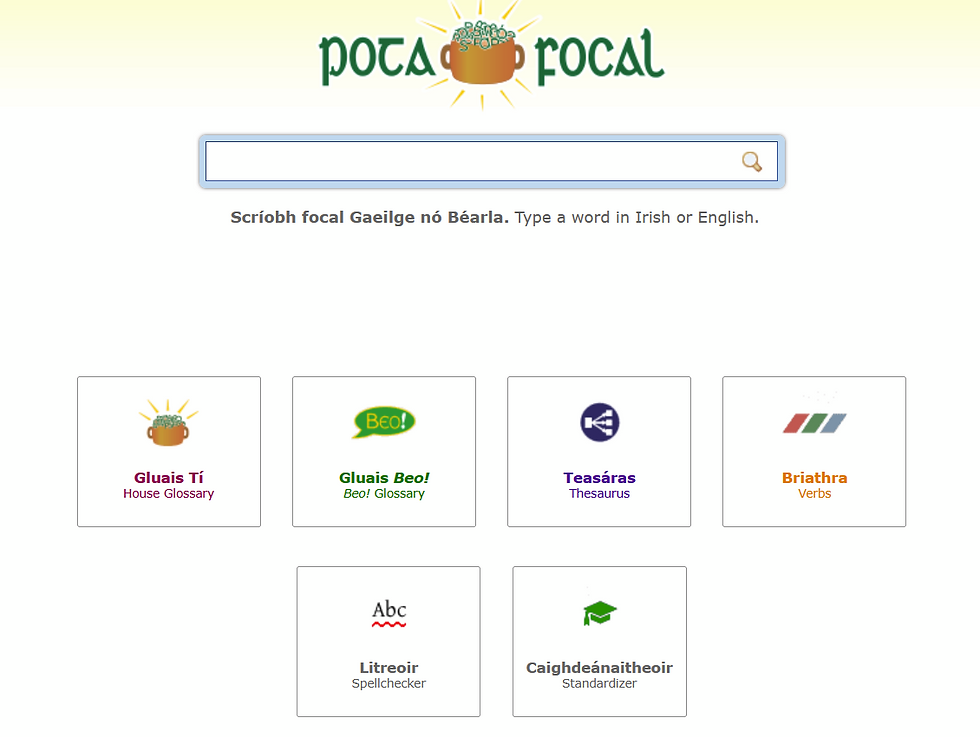
As a little shout-out, you will also see an advertisement for Native Dialogs at the bottom of the page. As far as language learning apps are concerned, it's what I point people to. Especially since Duo went "AI first". Given Michal's expertise, I trust it for learning Irish and very much like the concept of practicing practical conversation. Why learn how to say "Ian isn't wearing underpants and the monkey is annoying the horse" when you can be ordering drinks at a pub? Try it out for free.
If you've not used Corpas, it's brilliant. It has a lot of uses for researchers; the Gaois research group at DCU has put on Corpas workshops in the past. However, there are a few simple functionalities that I think are incredibly useful to learners that everyone should know about.
Basically, as the name suggests, Corpas is a, well uh, corpus of Irish. A 100-million-word balanced corpus of spoken and written Irish, to be specific. Corpas data comes from legitimate sources and publications, so you can trust that it's accurate. If you want to know if anyone has ever written or said what you're trying to write or say, it's a good place to start. Plug it into the search bar, and you can take a look at how many sources that word or phrase appears in, and you can see that word or phrase as it appears in each source, along with more information about each source. It's nice if you're not sure about word order and such because you don't have to require results to match your exact phrase; you can choose from broad and narrow search, and also how many words you will allow between each pair. If you're between a couple of options for phrasing, you can put in both and then see which one has more results, which fits better for your use case, and where it came from. It's also nice as a last resort if you're just trying to see if a word you're using that you can't find in available dictionaries does indeed exist. Useful!
While there are a lot of other bells and whistles for researchers, I'd say one more thing I can think of that is immediately useful for learners is under the Extras tab.

You'll sometimes see people approximate fluency levels (A1, A2, B1, B2, C1, C2) by how many words you know. Specifically, apps like Lingvist (which I used for French a while back, does not have Irish) are built on the idea that supposedly around 80% of the time you're utilising the first 2000 most common words of a language. Happily, I had most of the first 3000 words on the word frequency list above, so I'm going through the next couple thousand and picking out the words I don't know to make my own personal frequency dictionary/vocabulary list. Generally speaking, I like to learn vocabulary in the context of topics, so I've not stopped that, but as a little refresher, I'm liking running through the list, quizzing myself, and writing down new words to look up as a way to change up my study routine.
Special Mention
Foclóirí (Integrated into tuairisc.ie and beo.ie)
Foclóirí is a widget from Teanglann that developers can include in their Irish language websites. Basically, it makes all of the Irish words on a page clickable. When you click, a little Teanglann window pops up, and you can access the entire thing without opening up a new tab and getting distracted. On Tuairisc, you do have to click "Foclóirí" in the upper left-hand corner to activate it. You will not see that option on their mobile site. However, if you're on your computer, you have no excuse not to get all of your news through Irish now, right? :)
Conclusion
I like to come back to this post and update it from time to time as things are constantly evolving. There are a couple of resources I really love that I haven't added yet (canuint.ie and logainm.ie for starters), but for now, the ones above are a great place to get started if you're looking for help with writing and talking.


Comments